Managing student records becomes much easier when all information is organized in one place. With EzSchools, schools can quickly view, search, filter, and access student information through a centralized student management system. Instead of checking multiple registers or Excel files, administrators can find the required student record within seconds.
EzSchools is designed to bring important school operations—including student management, fees, attendance, exams, report cards, and other workflows—together in one platform. The system also supports Excel data import, making it easier for schools to move their existing records into a digital environment.
Open the Students List
After students are enrolled, the Students section becomes the central place for managing their records. From here, administrators can access student information without going through separate files or registers.
The student management system can help schools maintain organized records while reducing manual record-keeping. EzSchools also allows existing student data to be imported from Excel with validation and preview, making the transition from traditional record management easier.
Depending on the information available in your school setup, the student list can be used to identify students through details such as their name, admission information, class, section, and other relevant records.
Search for Students Quickly
When a school has hundreds or thousands of students, manually going through a long list can waste valuable time. A search feature makes it much easier to locate a particular student.
Instead of checking records one by one, administrators can search for a student using relevant information such as their name, admission number, or roll number. This makes everyday administrative work faster and helps staff access the right student record when they need it.
For example, if a parent contacts the school regarding a student's fees or attendance, the administrator can quickly find the student's profile and review the necessary information.
Filter Students by Class and Section
Searching is useful when you know the student's details, but filters are especially helpful when you want to view a specific group of students.
You can organize student records using criteria such as:
Class: View students belonging to a particular class.
Section: Narrow the list further by selecting a specific section.
Status: Identify active students or review records of inactive students.
Search: Find a specific student using available identifying information.
Filters can also be combined to make the results more specific. For example, you may want to view Class 5 + Section A + Active students rather than reviewing the complete student database.
This type of organized filtering is particularly useful for administrators and teachers who regularly work with specific classes or sections.
Open a Student Profile
Once you find the student you're looking for, opening the student's profile gives you access to their available information in one place.
A well-organized digital profile can help administrators review important student details without searching through multiple documents.
The profile can include areas related to:
Profile
This section contains the student's basic personal, academic, and contact information. Keeping these details digitally organized makes it easier to update and access student records whenever required.
Parents
Parent or guardian information can be linked with the student's record. This is particularly useful when schools need to communicate with families regarding attendance, fees, results, notices, or other important matters.
EzSchools provides a parent and student portal, allowing families to access information such as attendance, homework, results, report cards, fees, and notices through their own login.
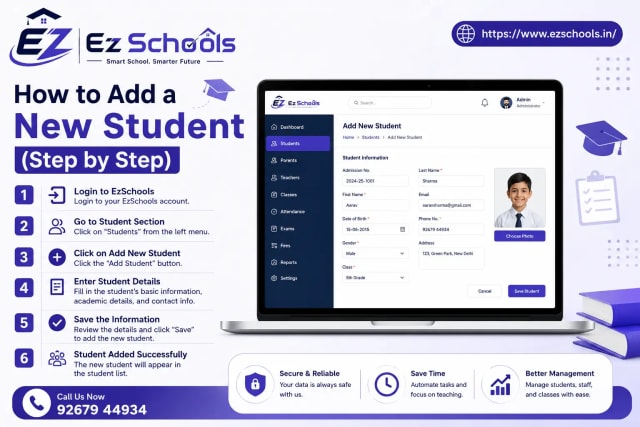
Read Blog - How to Add a New Student (Step by Step)
Fees
The student's fee-related information can be managed as part of the school's broader fee management workflow. EzSchools supports fee collection and provides parents and students with access to fee information through the portal.
Attendance
Attendance records are an important part of student management. Digital access makes it easier for schools to maintain attendance information and for parents and students to stay informed.
Marks and Academic Records
Academic information, including examination results and report cards, can be managed digitally. EzSchools brings exams and report cards into the same school management platform, helping schools keep academic information organized.
Documents
Schools often need to maintain different student documents throughout the academic year. Keeping these records digitally can reduce dependency on physical paperwork and make information easier to access when required.
Print or Export Student Information
Sometimes schools still need physical copies or external reports. EzSchools supports Excel/CSV export and printing, making it easier to take information outside the platform when necessary. (
This is useful when administrators need to prepare records, maintain documentation, or share reports.
Keep Student Management Simple with EzSchools
One of the biggest advantages of a digital school management platform is that information can be managed from a centralized system instead of scattered registers and spreadsheets. EzSchools connects student management with other essential school functions such as admissions, fees, attendance, examinations, report cards, payroll, transport, and parent communication.
The platform is also designed to work across desktop, tablet, and mobile devices, giving school staff flexibility in how they access their system.
Final Thoughts
Viewing, searching, and filtering student records should not be a complicated administrative task. With EzSchools, schools can organize student information digitally, find records faster, manage related academic and administrative details, and keep parents connected through the student and parent portal.
By moving away from disconnected registers and spreadsheets toward a centralized school ERP, administrators can spend less time searching for information and more time managing the school effectively.
Book a FREE Demo today.
📞 WhatsApp: +91 92679 44934
🌐 Website: https://www.ezschools.in
📧 Email: info@ezschool.com