Managing student records is one of the most important responsibilities of any school or educational institution. When there are only a few students, adding information manually may seem simple. But when a new academic session begins and hundreds or thousands of students need to be added, entering every record one by one can become a time-consuming task.
That is where EZSchools makes student management easier. With features such as Bulk Import, Student Export, and Document Management, schools can organize large amounts of student information efficiently while reducing repetitive administrative work.
Whether you are starting a new academic session, updating student records, or maintaining important documents, EZSchools provides a convenient way to manage everything in one place.
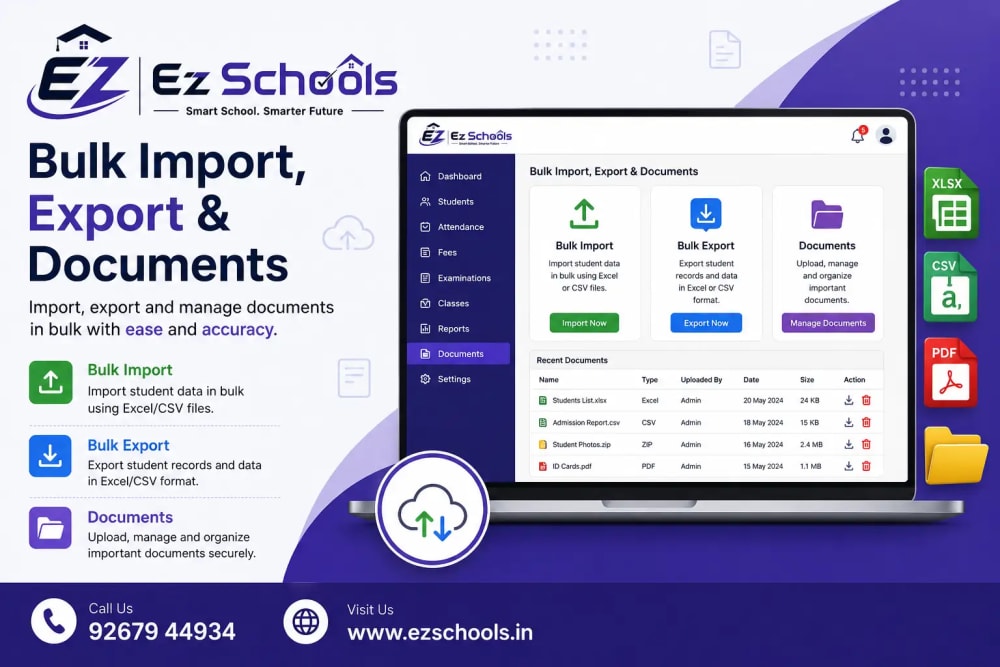
Bulk Import Students from Excel
Adding students individually can take a lot of time, especially during a new admission session. If your school needs to add hundreds of students at once, the Bulk Import feature can make the process much faster.
To begin, go to the Students section and click the Import button. You will find an option to Download Template. This template is an Excel file containing the correct columns required by the system.
Download the template and enter your student information into the appropriate rows. Because the template already contains the required structure, you do not need to create your own spreadsheet format from scratch.
EZSchools allows you to import up to 5,000 students per file, making it particularly useful for schools handling large student databases.
Some fields, such as Admission Number or Roll Number, can be left blank if you want the system to generate them automatically. This can save additional time during bulk data entry.
Once your Excel file is ready, return to the Import page. You can either drag and drop the .xlsx file into the upload area or click to browse your computer and select the file.
Validate Student Data Before Importing
One of the useful parts of the bulk import process is the validation preview.
After uploading your Excel file, the system checks the information and displays how many rows are valid. If there are problems with certain records, the system highlights those rows so you can identify them before completing the import.
This helps prevent incorrect or incomplete information from entering your student database.
If some rows contain errors, you do not necessarily need to start over. The valid rows can still be imported, while the problematic rows can be corrected separately.
Once you are satisfied with the validation results, click Import X Students to complete the process. After successful completion, the system displays a confirmation showing how many student records were imported.
Helpful Tip for Bulk Import
Before uploading your file, make sure you use the EZSchools template and keep the column structure unchanged. Avoid renaming, deleting, or rearranging columns unnecessarily.
If some rows are highlighted as having errors, correct those specific records in your Excel file and upload them again. This approach makes bulk data management much easier and saves administrative staff from repeatedly entering the same information.
Export Student Records to Excel
Bulk management is not only about importing information. Schools may also need to download student records for reporting, analysis, record keeping, or administrative purposes.
With the Student Export feature, you can quickly download your student information as an Excel file.
Go to the Students list and click the Export button. The system generates and downloads a students.xlsx file containing the relevant student records.
One particularly useful feature is that the export follows your current filters.
For example, suppose you want a list of only Class 5 students who are currently active. Apply those filters to the student list first and then click Export. The downloaded Excel file will contain only the students matching those selected criteria.
This makes it easier to create focused lists without manually removing unnecessary records after exporting.
Schools can use exported data for internal reports, administrative reviews, data analysis, or offline record keeping.
Upload and Manage Student Documents
Student records often contain more than basic information. Schools may need to maintain important documents such as birth certificates, transfer certificates, Aadhaar copies, and other supporting documents.
EZSchools provides a Documents section within each student's profile to help keep these files organized.
To upload a document, open the relevant student's profile and navigate to the Documents tab. Click Upload Document and attach the required file.
This provides a convenient way to keep important student documents connected to the correct student profile instead of storing files separately across different folders or computers.
For example, if a student submits a birth certificate or transfer certificate, the school administrator can upload it directly to that student's profile. When the document is needed later, it can be accessed from the same record.
If an uploaded document is no longer required or was added by mistake, you can remove it by clicking the trash icon associated with the document.
Why Bulk Import, Export and Documents Matter
Managing student information efficiently can have a direct impact on administrative productivity. Manually entering hundreds of records, searching through separate files, and maintaining paper documents can consume valuable time.
With EZSchools, schools can simplify these processes through a centralized digital system.
Bulk Import helps schools add large numbers of students quickly.
Export makes it easier to download filtered student information when needed.
Document Management keeps important student files connected to individual profiles.
Together, these features can make student record management more organized and convenient.
Manage Student Records Smarter with EZSchools
A growing school needs efficient tools to handle increasing amounts of student information. From new admissions to academic sessions, administrators regularly deal with large datasets and important documents.
Instead of spending hours entering student information individually or searching through scattered files, schools can use EZSchools to streamline their student management workflow.
The combination of bulk Excel import, filtered student export, and profile-based document management provides a practical approach to keeping student records organized.
Whether you are preparing for a new session, updating your existing database, or managing student documentation, these features can help reduce repetitive administrative work and make everyday record management simpler.
With EZSchools, schools can spend less time managing paperwork and more time focusing on what matters most—creating a smooth and efficient educational environment for students, teachers, and administrators.
Book a FREE Demo today.
📞 WhatsApp: +91 92679 44934
🌐 Website: https://www.ezschools.in
📧 Email: info@ezschool.com